Summarize this article in:


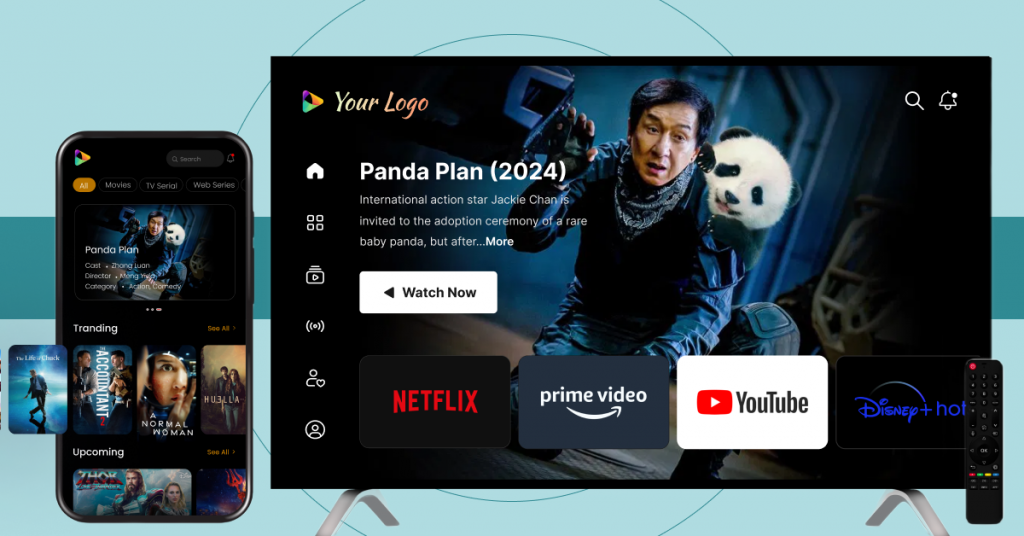
Here are 9 essential steps for smart TV app development. From audience strategy and platform selection to security and monetization, it outlines everything, even costs and key features.
Smart TV app development involves building apps for TVs, like Apple TV, Samsung Tizen, LG webOS, and Android TV.
However, unlike mobile applications, Smart TV applications are required to support navigation from a distance, a 10-foot user experience, and video streaming for large screens.
Strategy Analytics predicts that 51% of global households will have a Smart TV by the end of 2026. This growth is creating a demand for secure, scalable TV use that can stream content over different OS platforms.
This guide outlines smart TV app development, including the most important features, costs, technical issues, and tips for successful development. Let’s get started.
Key Steps in Smart TV App Development
TL;DR
| Stage | Core Implementation Focus |
| Audience & Platform Scoping | Define your target region to decide on the codebase (native or cross-platform) to use, such as Samsung Tizen, LG webOS, Android TV, and Roku OS |
| Architecture & CMS Setup | Set up a strong video CMS with custom metadata and cloud streaming pipelines based on HLS/MPEG-DASH and Multi-CDN switching |
| The 10-Foot UI/UX | Create layouts to be optimized for long-distance viewing and remote control D-pad navigation |
| Security & Monetization | Protect assets with studio-level Multi-DRM security settings and roll out customized revenue models (AVOD, SVOD, TVOD) |
| Vetting & Market Launch | Before going to your vendor portal, such as Samsung Seller Office or LG Seller Lounge, conduct in-depth cross-device testing |
- Fully Customizable
- Lifetime Ownership
- On-Premise/On-Cloud
- 100% White-label
- Zero Revenue Share
- Hire Developers
Step 1: Define Your Target Audience and Content Strategy
The first step in building a successful smart TV app project is to understand user demographics, viewing habits, and regional device ecosystems to inform your UI design and video delivery.
Determine your target audience
- Geographical locations: Identifies regions of audience cluster
- Device preferences: Keeps track of active users of Android TV, Samsung Tizen, LG websOS, or Apple TV
- Viewing habits: Separates the demand for live streaming, VOD, and short-form media
Create Content Categories and Formats
Organize your video library to match viewer consumption patterns:
- Live events: Real-time broadcasts and sports
- On-demand catalogs: Traditional VOD and episodic series
A structured asset strategy directly improves your backend CMS metadata tagging. Library organization on this approach also makes content more discoverable for the viewer and ensures steady video streaming performance on every device.
Analyze Device & Regional Ecosystems
| Target Region | Dominant Smart TV Platform | Primary Operating System | Core Development Stack |
| North America | Roku OS, Amazon Fire TV | Roku OS / Fire OS | BrightScript, Java / Kotlin |
| Europe & Latin America | Samsung Tizen, LG webOS | Tizen OS / webOS | HTML5, CSS, JS Frameworks |
| Global / South Asia | Android TV, Google TV | Android TV | Jetpack Compose for TV |

Step 2: Select a Smart TV App Development Partner
Choosing the right development partner affects project timelines and long-term maintenance. The ideal partner should support multiple Smart TV platforms while providing the flexibility to adapt your application as business requirements evolve.
Analyze Customization and Source Code Ownership
Before signing a contract, evaluate how much control you will retain over the application:
- Verify source code ownership terms
- Assess support for native development and cross-platform development
- Review customization options for UI and monetization
Increased ownership helps decrease the dependence on the vendors and makes future scalability easier.
Consider Scalability and Post-Launch Support
After the app is launched, a Smart TV will need constant updates.
- Support of new OS versions and security patches.
- Ongoing performance optimization
- The same thing applies to Maintenance on Android TV, Samsung Tizen, and LG webOS.
With great post-launch support, stability is maintained as your audience grows.
Step 3: Choose Your Smart TV Platforms
Choosing which platforms to go with depends on a balance between engineering resources and regional device market share. Your partner makes sure to guide you through target ecosystems for optimum viewership reach.
Native vs. Cross-Platform Development Approach
Native development platform-specific technologies to build apps for individual operating systems. Cross-platform development involves reusing code from one platform to another, typically through the use of frameworks like React Native or Flutter.
- Native apps offer greater platform optimization
- Cross-platform apps save development time and increase code reusability
Select Platforms Based on Audience Demand
Focus on the platforms your viewers use most:
- Android TV
- Samsung Tizen
- LG webOS
- Apple TV
- Amazon Fire TV
This helps maximize reach while avoiding unnecessary development overhead.
Step 4: Design a TV-Optimized User Experience
A custom Smart TV application needs to be created for distant viewing and remote navigation. Your development partner configures the architecture for television screens viewed from several feet away.
Set up a Remote-Friendly Navigation Flow
Navigation flows support effortless movement across screen using a television remote.
- Consistent focus management
- Minimal navigation depth
- Smooth directional controls
Optimize for the 10-Foot Viewing Experience
The 10-foot user experience ensures content remains accessible from a distance
- Larger typography and interactive elements
- Adequate spacing between UI components
- Layouts optimized for different screen sizes and resolutionlutions
Simplify Content Discovery
Your development partner implements content discovery mechanisms that enable viewers to find on-demand media, live events, or a scheduled linear channel with minimal effort:
- Structured content categorization
- Personalized recommendations
- Integrated search functionality
Step 5: Configure Your Video CMS
A centralized Video CMS is the backbone of a Smart TV application, and can be configured to manage video assets, streamline delivery of content, and support future app growth on multiple OTT platforms.
Organize and Categorize Content
Content should be structured in a way that improves browsing and discovery.
- Category-based content organization
- Metadata tagging for videos
- Genre, language, and content-based grouping
- Playlist and Watchlist Logic
The key to creating the best Smart TV app is to enable personalised viewing journeys that encourage increased viewing time.
Curated playlists for content collections
- User-specific watchlists
- Continue-watching functionality
The right CMS configuration can help to keep the video library well organized while enhancing the viewing experience.

Step 6: Set Up Video Streaming Infrastructure
Your development partner configures a high-capacity cloud pipeline to handle real-time content delivery without playback interruptions or buffering.
Cloud Encoding and Transcoding
Video files must undergo video transcoding and encoding to generate formats compatible with different devices, screen resolutions, and operating systems.
- Multi-format video conversion
- Resolution-specific encoding profiles
- Device compatibility optimization
Adaptive Bitrate Streaming
Adaptive Bitrate Streaming (ABR) automatically adjusts video quality based on available bandwidth.
- Reduced buffering during playback
- Consistent viewing experience across networks.
- Optimized video delivery for varying internet speeds
Multi-CDN Switching Protocols
Multiple Content Delivery Networks (CDNs) enhance content availability and network performance.
- Automatic traffic routing
- Reduced latency across regions
- Improved streaming reliability during peak traffic periods
A robust infrastructure helps maintain smooth video streaming performance as audience demand scales.
Step 7: Implement Content Security
Content security is a critical part of smart TV app development. Your development partner deploys several layers of protection to secure the highest quality video content and minimize piracy risks across OTT platforms and connected TV devices.
Here are some of the common video security characteristics:
- Multi-DRM support (Widevine, PlayReady, FairPlay)
- AES video encryption
- Dynamic watermarking
- Secure video storage
- Access management controls
- Single Sign-On (SSO)
- Password-protected content
- Geo-blocking and IP restrictions
- Screenshot prevention
- Secure offline playback
- SSL certification
- Paywall integration
These protections ensure that content is viewed by the appropriate users and help meet the requirements across different Smart TV platforms.
Step 8: Select a Monetization Model
Monetization planning has an impact on both user experience and revenue generation. Your development partner integrates a model that aligns with your content strategy and audience preferences.
AVOD
Advertising Video on Demand (AVOD) receives revenue from ads that are shown before, during, or after video playback.
SVOD
Subscription Video on Demand (SVOD) gives users the ability to watch unlimited content with a recurring monthly or annual subscription.
TVOD
Transactional Video on Demand (TVOD) lets viewers buy or rent individual content on a pay-per-view basis.
Hybrid
A hybrid model (HVOD) combines multiple monetization strategies to create diversified revenue streams.
Other monetization possibilities include:
- Freemium access
- Subscription bundles
- Live event monetization
- Discount and promotional offers.
- Content syndication partnerships
- Dynamic ad insertion (SSAI) models
Step 9: Test and Launch Your Smart TV App
Rigorous quality assurance ensures that your app runs without a hitch before it launches. Your partner conducts smart TV app development testing to identify the stability issues that require attention before the public release.
Functional and Performance Testing
The engineering team conducts rigorous testing under varying network conditions. This process involves optimizing system metrics to prevent performance drops:
- Resource Optimization: Monitoring CPU and memory usage to eliminate interface lag
- Stability Assurance: Eliminating edge-case crash scenarios and application freeze bugs
- Playback Verification: Running overscan testing and proper subtitle synchronization
Cross-Platform Compatability
The provider performs smart TV app testing across multiple real-world environments. Technicians test the application on a wide range of TVs and native TV firmware versions to ensure an even more consistent experience that meets rigorous production standards.
Launch and Optimize
Your partner manages submission logistics through vendor portals like the Samsung Seller Office and LG Seller Lounge. They work through the unique approval process of each platform to ensure a smooth launch, and they continuously monitor the indicators to deploy future security patches.


How Much Does Smart TV App Development Cost?
Smart TV application development costs can vary depending on the approach used, the platforms covered, and requirements such as streaming infrastructure, customization, and ongoing maintenance.

Factors Affecting Development Costs
- The number of platforms supported: Android TV, Samsung Tizen, and LG webOS
- Native vs. cross-platform development
- Custom UI/UX requirements
- Video streaming infrastructure
- Content security and DRM implementation
- Connecting with CMS and backend services
- Post-launch maintenance and support
| Development Model | Cost | Timeline | Pros | Cons |
| Custom In-House Development | $80,000 – $300,000+ | 6-12+ months | Complete control & custom engineering | Expensive and takes longer to develop |
| SaaS App Builders | $500 – $5,000/month | 1-3 weeks | Quick deployment and initial investment costs are low | Low customization options and subscription charges, including per-subscriber and bandwidth charges |
| Enterprise White-Label Platforms | $30,000 – $50,000+ | 2 days to 4 weeks (depending on customization needs) | Rapidly launched, highly customizable, source-code owned, scalable architecture | Requires a larger initial investment compared to SaaS platforms |
What Are the Essential Features of a Custom Smart TV App?
For being able to compete in the streaming market, your application should have a good infrastructure. Make sure that your architecture has these essential features.
Intuitive TV User Interface and Remote Navigation
Your application needs to have a high-quality 10-foot user experience and have a very strict focus on management rules. What viewers need is a seamless D-pad navigation between content rows with a standard television remote.
Video Content Management System
An integrated video CMS is essential to make media asset management easy. The architecture should be able to support custom metadata, which is crucial for managing extensive library categorizations and automated scheduling needs.
Advanced Search and Content Discovery
A prominent, native search bar is needed on the interface with semantic search technology. The viewer needs to be able to access preferred streams in deep archives within three clicks.
Personalized User Profiles and Watchlists:
Multiple dedicated viewer accounts need to be supported by the backend architecture. Custom watchlists and an accurate view history tracking system are needed for easy resume-playback.
Multi-DRM Content Security
To avoid revenue loss, security pipelines have to be studio-grade Multi-DRM. Implementing Google Widevine, Apple FairPlay, and Microsoft PlayReady encryption prevents digital piracy and unauthorized distribution.
Flexible Monetization Options
The application needs to be able to accommodate a variety of revenue engines. Maximize your overall viewership revenue with secure SVOD payment gates, transactional TVOD systems, and customized AVOD solutions.
Global CDN Delivery
The infrastructure should be capable of dynamically routing traffic with intelligent multi-CDN switching protocols. This configuration helps avoid edge congestion to ensure low-buffer delivery to living rooms all over the world.
Low Latency Adaptive Video Streaming
The platform needs to be able to support HLS and MPEG-DASH streaming protocols. This feature guarantees instant playback. It automatically changes the quality of the stream according to the real-time internet speed of the users.
Engagement and QoE Analytics
The built-in real-time analytics keeps an eye on key application performance metrics. The dashboard should provide an analysis of CPU usage, memory usage, and buffer thresholds to avoid unexpected crash situations.
AI-powered Recommendations
Machine learning algorithms are needed to interpret the active viewer preferences on the platform. This engine has to deliver relevant media recommendations directly to the home screen feed of the user.
What Challenges Should You Expect During Smart TV App Development?

- Platform Fragmentation: The market has several different Smart TV platforms. You have to build for Samsung Tizen, LG WebOS, and Android TV. Each ecosystem has totally independent native coding frameworks.
- Complex Remote Control Input Variations: TV apps use only D-pad inputs from the remote controller. It’s hard to design fluid focus management logic. Global viewers experience interface freeze situations when navigating with unoptimized navigation pathways.
- Strict App Store Guidelines and Rejections: When publishing, the app needs to pass rigorous compliance vetting done by the vendor. There are strict rules in place in portals such as Samsung Seller Office. Even a minor platform non-compliance results in the submission rejection.
- Dynamic Multi-DRM Pipeline Configuration: High-value media files require special engineering to protect them from digital piracy. Installing Google Widevine, Apple FairPlay, and Microsoft PlayReady is a challenging backend integration task.
- Latency and Real-Time Buffering Thresholds: Television viewers want live broadcast quality, which means the latency must be minimized. Stable adaptive bitrate streaming over legacy TV hardware models is very difficult. High Latency always leads to high user attrition.
Why Partner with VPlayed for Your Smart TV App Development?
VPlayed completely removes the above-mentioned challenges by providing an integrated Software as a Product (SaaP) framework. Now let’s see how the platform has solved the majority of development bottlenecks out of the box:
- Unified Multi-OS Deployment: VPlayed bypasses operating system fragmentation completely. The core architecture runs your application on Samsung Tizen, LG webOS, and Android TV. You save months of development efforts.
- Flawless Remote Focus Management: There is a pre-optimized 10-foot UI for the platform. It automatically processes complex D-pad remote controls with its built-in navigation logic. This design will ensure no freeze with smooth scrolling.
- Guaranteed App Store Approval: VPlayed’s engineering team manages the entire submission logistical process. They not only make sure that your app conforms with the rigorous requirements of the Samsung Seller Office and LG Seller Lounge, but they do it quickly as well.
- Built-In Multi-DRM Security: Secures your revenue, without complex third-party coding. VPlayed has natively integrated Google Widevine, Apple FairPlay, and Microsoft PlayReady. This provides your video library with security that will last from the start.
- Ultra-Low Latency Delivery: The framework also supports the latest HLS and MPEG-DASH video player protocols. Together with smart Multi-CDN switching technologies, it ensures fast (instant) low buffer playback even on legacy TV hardware models.
In addition to addressing these fundamental technical challenges, VPlayed has no revenue-sharing arrangements. You get 100% control of the source code with just an upfront one-time license fee, and the profit is entirely yours.
Wrapping Up
Smart TV app development isn’t just about designing a TV screen interface. Careful planning is needed throughout the process, starting from platform selection, content management, streaming infrastructure, content security, monetization, testing, and long-term maintenance. Each stage affects the application’s performance, audience retention, and revenue potential.
With the Smart TV ecosystems growing across Android TV, Samsung Tizen, LG webOS, Apple TV, and other connected devices, developers need to create applications that will fit multiple platforms and user expectations.
Through audience-centric design, effective video handling, and intuitive interfaces, organizations can build competitive Smart TV experiences. Also, platform adaptability helps ensure these experiences remain future-ready in the ever-evolving streaming environment.
If you’re thinking of creating your own smart tv app for your brand?
- Request Demo Book a Live, Personalized Demo
- Contact Sales Reach Out to Our OTT Experts
Frequently Asked Questions(FAQ)
1. What is Smart TV app development?
It is the development of custom software for televisions connected to the internet, focusing on high-definition streaming and remote navigation. The design combines Video CMS and DRM security to enable secure delivery of AVOD and SVOD content straight to the living room screen.
2. How To Develop A Smart TV App?
Developing a Smart TV app involves creating an application for a specific operating system that enables users to access a wide range of entertainment and information from the comfort of their homes. Companies often hire top Smart TV app developers to ensure seamless streaming not only on big screens but also across mobile devices and laptops.
3. How To Expand Your Business With Smart TV App Opportunities?
Some of the smart TV app development companies that are increasingly trending have redefined With the increasing number of smart TV app development companies, the landscape of home entertainment has been redefined, offering numerous business opportunities. These apps enable businesses to conduct or attend live training sessions, host remote video conferences, and even set up their own Shopify stores. Leading companies like Samsung and Apple are at the forefront of this revolution.
4. What Is The Best Way To Generate Revenue From Smart TV Apps?
To generate revenue from Smart TV apps, smart monetization of services is crucial. The most preferred method is the AVOD (Advertising-based Video on Demand) model, where advertising revenue plays a significant role in generating income. Leveraging specialized functionalities and lucrative features can lead to noteworthy adoption and increased subscriber fees.
5. How VPlayed Helps Content Owners To Make Branded Smart TV Apps?
VPlayed empowers content owners to create branded Smart TV apps that cater to the unique preferences of end-users. With limitless content delivery across multiple channels, VPlayed ensures the best revenue making opportunities by developing Smart TV apps with extensive customization. Nevertheless, these apps are tailored to the brand’s specific needs, incorporating the latest features within their budget constraints.

Blogger & OTT Expert at VPlayed. Interested in digging deep into video streaming media tools, blog, discuss and share views on the legal OTT solution' & latest technologies tips, and tricks. Also passionate about photography loves to capture the pure essence of life.