Summarize this article in:


This article looks at video streaming technology and fundamental delivery methods. It explains the major distinctions between traditional downloading methods and helps businesses create their own OTT (Over the Top) services.
Video streaming transformed how we watch and share content and effectively eliminated the need for slow downloads and scheduled broadcasts. The ability to stream content means no wait, and high-quality videos are delivered instantly to almost any device, anywhere.
The impact of streaming extends well beyond improving access to content; 91% of businesses leverage video as a marketing tool to help them scale to new audiences globally.
Whether you are interested in the technology behind the play button or are considering starting your own service, this guide will demystify video streaming and articulate why streaming outperforms traditional downloading in nearly every way.
What is Video Streaming?
Video streaming is the continuous delivery of compressed media files from a file server to a user’s device via the internet. A video streaming service eliminates the user’s need to wait for a full file download by ingesting, encoding, and transmitting data packets. This results in an instant delivery of the file and enables playback via HTTP-based protocols (i.e., HLS, DASH) to smart TVs, desktops, and mobile devices.
There are two main streaming formats organizations adopt today: Video On-Demand (VOD) and Live Streaming. A VOD streaming service enables viewers to play recorded content of their choosing at any time, whereas a Live Streaming service broadcasts video content in real-time. An online video streaming platform delivers content from file servers to the end users in this streaming ecosystem.
How does Video Streaming Work?
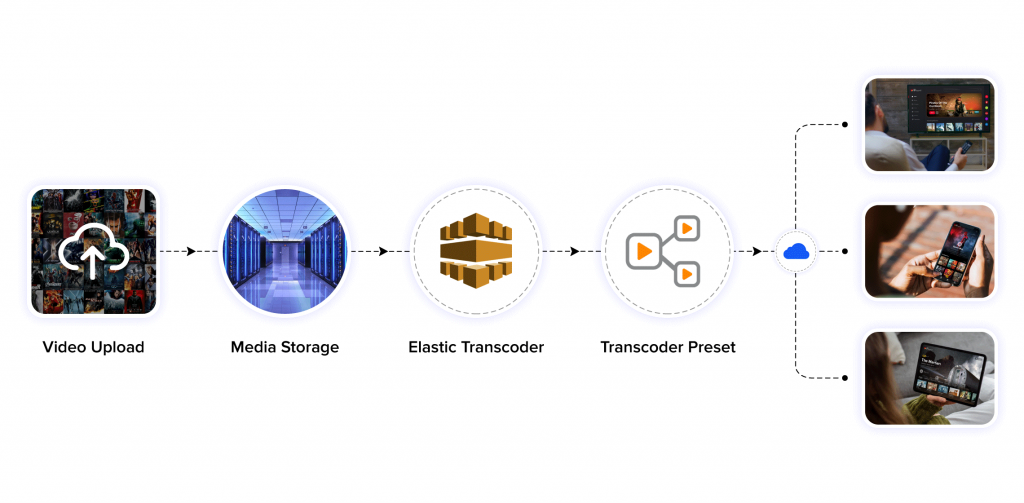
When a user hits play, an enterprise video streaming solution employs a five-step workflow to deliver a continuous stream with minimal latency. These are the five steps: encoding and compression, segmentation, global distribution (CDN), adaptive bitrate (ABR), followed by decoding & playback. Let’s look at each one.
- Decoding and playback happen when a device decompresses data packets and displays them as a clean video stream.
- Encoding and compression convert master video files (in raw format) to standardized digital files by compressing them so the overall size of the files is much smaller while still preserving quality.
- Segmentation breaks an entire video up into many time-related chunks of data, and segments those chunks further into hundreds of small packets. This makes transmitting data over the internet very efficient.
- Global Distribution (CDNs) involves edge servers directly sending packets from the server that is closest to the user making the request.
- Adaptive Bitrate (ABR) or streaming protocols adjust the quality of a video being played to accommodate changes in internet speeds to avoid delays in playback.
To better the streaming, check what are the secure video streaming methods and how it supports content distribution.
- Fully Customizable
- Lifetime Ownership
- On-Premise/On-Cloud
- 100% White-label
- Zero Revenue Share
- Hire Developers
Streaming vs Downloading: What’s the Difference?
| Feature | Video Streaming | Downloading |
| Playback | The player loads only a fraction of the file at a time and plays almost instantly (the user can even skip ahead). | Playback begins only after the entire file has been completely transferred to your local storage. |
| Internet Requirement | The player needs to have an active connection to an internet source to continuously stream media data packets to the player. | Only needs the internet to download the file; the media file can be played back at any time without an internet connection |
| Storage Usage | Uses only a small amount of storage by keeping temporary cache data instead of saving large raw files. | Needs a lot of storage on a hard drive or phone to store permanent video files. |
| Quality Control | Uses Adaptive Bitrate Streaming (ABR) to adjust the video quality based on the speed of the internet connection. | Can only be streamed in a specific resolution (e.g., 1080p MP4 file), which cannot dynamically adjust to changing internet speeds. |
| Content Security | Allows for Digital Rights Management (DRM) by the OTT platform and watermarking to protect content. | Once files are stored on a local hard drive, unauthorized redistribution of media files is difficult to control. |
| Common Examples | Twitch for live events, Netflix for VOD movies, and enterprise video portals like VPlayed. | Downloading an MP4 file from a web browser, offline torrents, and saving an email attachment. |
Types of Video Streaming Content
Three video content delivery models in modern digital media engage audiences on multiple devices. Understanding each model’s mechanism and revenue model is foundational to creating a successful video streaming business.
Video On Demand (VOD)
VOD gives viewers the ability to control playback and access content whenever they choose. Like typical video streaming services, a VOD system delivers media files utilizing cloud-based servers set up for an on-demand delivery system.
- Best for: content with a high volume and repetitive consumption such as corporate training, educational videos, and entertainment content like movies and shows.
- Monetization: Commercial systems (SVOD like Netflix), systems with advertisements (AVOD like YouTube), or individually priced items for rental or purchase (TVOD like Apple TV/Google TV).
- Key Advantage: 24/7 instant availability of content on any device.
- Pro Tip: Use tagging and local metadata for your VOD library to optimize content for both searchability and recommendations.
- Real World Examples: Amazon Prime Video, Netflix, Disney+, and a number of enterprise video libraries.
Live Streaming & Real-Time Broadcast
Live streaming is the real-time delivery of events resulting in immediate interest and drawing viewers to set up an interactive system for immediate commenting, polling, and addressing questions. A real-time online video platform delivers rapid broadcasts to all corners of the globe with low-to-no-latency frameworks (like WebRTC or LL-HLS) that allow for real-time synchronization.
- Best for: Live sporting events, news, and corporate announcements, product launches, and virtual concerts.
- Monetization: Pay per view (TVOD), advertising, memberships, and tipping or crowdfunding.
- Key Advantage: Immediate delivery attracting the highest engagement. Reaches peak audiences with a smart use of FOMO (fear of missing out).
- Pro Tip: Leverage automated live-to-VOD workflows. These capture your live streams and automatically publish them as indexed VOD assets when your broadcast unwinds.
- Real-World Examples: Twitch, YouTube Live, ESPN+, and proprietary corporate webcasts.
Linear Streaming & Cloud Playout (FAST/VOD Channels)
Linear streaming enables a “lean-back” experience of live streams similar to scheduled programming of traditional television. Using cloud playout systems, media companies can create virtual channels by combining a library of on-demand content and live streams. This has become a popular method to create Free Ad-Supported Streaming TV (FAST Channel).
- Best for: Entertainment, news, and other types of content that can be repeatedly broadcast.
- Monetization: Brand sponsorship and video advertising (server-side ad insertion – SSAI).
- Key Advantage: Initiates automated video streaming of pre-programmed content, thereby eliminating the burden of content selection on the user.
- Pro Tip: Automated video streaming players allow users to watch uninterrupted, scheduled broadcasts without the need to choose what to watch, thus eliminating the burden of decision-making.
- Real-World Examples: Paramount’s Pluto TV, Fox’s Tubi, The Roku Channel, and Samsung TV Plus.
Key Features Involved in Video Streaming
To understand how video streaming functions at scale, it is important to first examine the core technical components that enable video delivery, playback, and performance.
Core Technical Components
1) Adaptive Bitrate Streaming (ABR)
Adaptive Bitrate Streaming (ABR) is a technological process for delivering video that dynamically adjusts quality in real-time based on the viewer’s internet speed and device. ABR begins by encoding a single video file into multiple versions (renditions) at different bitrates (e.g., 1080p, 720p, 480p). Then, the video player chooses the best-quality file that the device can play with the smallest amount of buffering (if not zero buffering).
2) Content Delivery Network (CDN)
A content delivery network or content distribution network (CDN) is a network of geographically distributed servers around the world. CDN works on a process called caching that temporarily stores copies of your video files in those distributed servers. When a viewer requests specific video content, the nearby server of a video CDN delivers a copy of that video file, thereby reducing buffering and resulting in a smooth playback.
3) Video Encoding & Transcoding
Encoding compresses the overall size of the video file without compromising the overall quality, whereas video transcoding involves optimizing videos to ensure seamless playback. Some popular video codecs used are H.264, VP9, and H.265 (HEVC). These codecs deliver sharp visuals without consuming excessive bandwidth or storage space.
4) Streaming Protocols
Streaming protocols are a set of rules or standards that determine the transmission of video data from one device to another, over the Internet. These protocols are essential for ensuring smooth, reliable video playback across various devices and networks. Real-Time Messaging Protocol (RTMP), HTTP Live Streaming (HLS), MPEG-DASH, and Web Real-Time Communications (WebRTC) are some of the common streaming protocols.
User Experience (UX) Features
1) Multi-Device Compatibility
Multi-device compatibility also allows users to switch between devices without interrupting their viewing experience. This ensures viewers can access the same content seamlessly, regardless of screen size or operating system.
2) Offline Viewing/Downloads
Offline viewing enables users to watch video content without an active internet connection. Instead of saving video files locally, streaming platforms store encrypted video data within the application, allowing temporary access under controlled conditions.
3) Player Controls
Player controls allow viewers to manage video content, with controls like play, pause, volume adjustment, playback speed, captions, and quality selection. These controls give users flexibility over their viewing experience and ensure accessibility across different user needs and preferences.


Platform & Content Management Features
1) Content Management System (CMS)
A CMS, especially an enterprise video content management system, allows businesses and media teams to upload videos, manage metadata, categorize content, and control access from a central dashboard. The CMS simplifies content workflows and ensures videos are easy to discover and distribute.
A clearer understanding of what is video CMS? helps ensure a stronger implementation strategy.
2) Live Streaming & VOD
Video streaming works in both ways: live and video on demand (VOD) delivery. Live streaming enables real-time broadcasting of live events, whereas VOD allows viewers to watch pre-recorded content at their convenience.
3) Security & DRM
Security and digital rights management (DRM) protect video content from unauthorized access, copying, and redistribution. Streaming platforms use encryption, access controls, and DRM technologies to enforce content usage rules. These measures help content owners maintain control over their intellectual property while delivering video securely.
4) Real-time Analytics
Real-time analytics provide immediate insights into how viewers interact with video content. Metrics such as concurrent viewers, watch time, engagement levels, and drop-off points help businesses monitor performance. These insights support faster decision-making and content optimization.
Monetization & Business Features
1) Flexible Monetization Options
Monetization options allow businesses and media-tech enterprises to generate revenue from their video content. While subscriptions (SVOD) enable video monetization with recurring revenue, advertisements (AVOD) unlock revenue from ad inventories (despite offering free content access to viewers). Pay per view streaming (TVOD) unlocks revenue for each transaction.
2) Geo-blocking
Geo-blocking enables content owners to restrict video access based on geographic locations. From both business and monetization standpoints, this helps massively, as content licensing agreements mandate geographic restrictions, thereby maximizing revenue from intended markets.
Check out the essential OTT platform features required to launch and scale your streaming service.
Limitations and Challenges of Video Streaming
While video streaming offers numerous benefits, it also presents certain technical and operational challenges that businesses must address to deliver consistent and reliable viewing experiences.
* Bandwidth & Latency: Limited bandwidth leads to buffering, reduced video quality, or playback interruptions, while high latency can cause noticeable delays, especially during live streams.
* Scalability: Scaling video delivery to support thousands or millions of concurrent viewers requires robust infrastructure, efficient content delivery networks (CDNs), and load management. Without proper scalability planning, platforms may experience outages or performance bottlenecks.
* Device Compatibility: Compatibility issues may arise due to differing hardware capabilities, software updates, or unsupported formats. Viewers access video content across a wide range of devices, operating systems, browsers, and screen sizes. Ensuring consistent playback and performance across all these environments can be challenging.
* Content Piracy: Unauthorized copying, redistribution, and recording of video content remain ongoing challenges in streaming. Even with protective measures in place, content can be illegally shared through screen recording or external capture methods. Piracy reduces revenue potential and undermines content ownership.
* Cyber Threats: Streaming platforms are exposed to various cyber threats, including account takeovers, credential abuse, distributed denial-of-service (DDoS) attacks, and malicious traffic. These threats can disrupt service availability and compromise user trust if not adequately addressed.
How To Create & Launch Your Own Video Streaming Platform
After understanding the fundamentals, benefits, and challenges of video streaming, the next step is to explore how a video streaming platform can be created and launched. Any business that wants to build a video streaming website should start with:
1) Plan Your Service
The first step in creating a video streaming platform is defining its purpose and audience. This includes identifying the type of content you plan to offer, the viewing experience you want to deliver, and the business goals behind the platform. Clear planning helps guide technical decisions and content strategies later in the process.
2) Choose Your Platform and Tech
Selecting the right technology stack is critical for reliable video delivery. This involves choosing video hosting infrastructure, streaming protocols, content delivery networks (CDNs), and player technology. Additionally, you must decide whether you want to create an online TV streaming or build standard VOD libraries. Businesses must also decide whether to build from scratch or use existing video streaming frameworks, depending on technical expertise and time-to-market requirements.
3) Build & Populate Your Platform
Once the technical foundation is in place, the platform can be configured and populated with content. This includes uploading videos, organizing content libraries, setting metadata, and designing the user interface. Testing playback, performance, and device compatibility at this stage helps ensure a smooth viewing experience.
4) Secure & Monetize
Security measures such as encryption, access controls, and digital rights management (DRM) protect content from unauthorized use. At the same time, monetization models such as subscriptions, advertising, or pay per view can be implemented to generate revenue. Balancing protection with accessibility is key to maintaining user trust and business viability.
To move beyond theory, check out how to monetize videos and make money online.
5) Launch & Grow
Launching a video streaming platform involves making the service available to users and monitoring initial performance. Post-launch, continuous optimization is important, including refining content offerings, improving user experience, and analyzing viewer data. Ongoing updates and engagement strategies support long-term growth and scalability.
Conclusion
Video streaming has become a foundational component of modern digital communication and content delivery. By enabling real-time and on-demand access to video across devices, streaming has reshaped how audiences consume content and how businesses distribute it at scale.
As explored throughout this blog, video streaming combines technical components such as adaptive bitrate delivery, content security, analytics, and monetization with emerging capabilities like AI-driven optimization and immersive media experiences. At the same time, it presents challenges related to infrastructure, security, and content rights that must be carefully managed.
- Request Demo Book a Live, Personalized Demo
- Contact Sales Reach Out to Our OTT Experts
Frequently Asked Questions (FAQ):
1. Why Is Streaming video Important For Your Business?
Professional-grade video streaming provides a great value while investing since consumer-grade solution aren’t capable of satisfying needs of large businesses. When it comes to video streams, they are cloud-based and provide advanced features like cutting-edge tech-stack, 6+ monetization models, everlasting ownership, robust CMS, first-class security, etc.
2. What Are The Different Types Of Video Streaming?
As global trends have been influencing consumer viewing habits the definition of streaming video sets to expand across wide range of niches. The media content is in the form of live or recorded streams, which are delivered to web, mobile or varied connected devices. Some of the common forms of streaming content are webcasts, podcasts, movies, TV shows, etc.
3. What Are The Benefits Of Streaming Video?
Some of the benefits that streaming businesses can own comprise of downloadable content at any circumstance, rendition of videos at flexible resolutions, reduced cost due to increased accessibility of the streaming, data storage is not with physical servers but on cloud, enhanced customer experience due to flexible options in playback, etc.
4. How To Start A Video Streaming Business?
While you tend to own up streaming videos you can set your revenue model to rapidly increase streaming ROI. Also you can leverage on the facility of centralized storage, ensure flexible payment gateways, choose a standard embed player, get network of server connected to each other for smooth delivery of content, instill security paywalls, & much more.
5. How Do I Monetize Video Content?
You can now independently stream & monetize on demand as well as live streaming content with major monetization models like Subscription VOD, Advertising VOD, Transactional on demand, Premium VOD, Video Paywalls, Coupons & promotions & lots more.

Senior Analyst specializing in Online video platforms, OTT, VOD, and white label video streaming solutions. Expert in analyzing industry trends, technologies, and monetization strategies to help businesses optimize their streaming services. Passionate about innovation and the evolving digital video landscape.